A forward deployed engineer (FDE) does production work inside a customer's environment. Their servers, their database, their security team's decisions, their change freeze. The job is to make something work there, today, without breaking a rule the customer never wrote down for you.
If you are about to hire FDEs, the interview has to put candidates where the job is: inside a customer's system, under the customer's rules. That takes more than a question bank. You need customer machines broken the same way for every candidate, a rule that makes the obvious fix wrong, a grader that can tell the two apart, and a record of how the candidate used AI. This post covers what to measure, what it takes to run that interview, and the 60-minute loop we built for it, stage by stage, with a rubric you can use tomorrow. The whole loop is ready on EasyEnv as the Forward Deployed Engineer role, and we build scenarios around your own product too.
What a forward deployed engineer actually does
The title comes from Palantir, where engineers were sent to sit with a customer and make the product work on the customer's data. AI companies, data platforms and services firms now hire for it under the same name. The details vary, but the week looks similar everywhere:
- Something the customer runs broke, and nobody on their side knows why.
- The customer wants their data from system A in your product by Friday, and system A has an API nobody likes.
- Traffic is about to grow and the customer wants to know what to change, inside their cloud account and their budget.
- Someone senior on the customer side needs a plain explanation of what happened and what their team has to do next.
None of that happens in your codebase. All of it happens under constraints the engineer did not choose.
Why the usual interview loop misses it
The standard loop is a coding round, a whiteboard design and a behavioural chat. Each one tests something real, and each one misses the FDE part:
- LeetCode tests code you wrote from scratch in a clean room. An FDE spends most of the day reading systems somebody else built. Speed on a puzzle says little about how they read an nginx error log on a box they have never seen.
- A whiteboard design has no customer. "Design a URL shortener" rewards the textbook diagram. The FDE version is "this runs on one VM and the customer's ops team is two people", and the right answer is usually the smallest change, not the biggest.
- A behavioural chat asks about constraints in the past tense. "Tell me about a time you respected a customer's security policy" gets a rehearsed story. What you want to see is the moment the forbidden fix is right there and works.
The gap is the same in all three: the candidate is never put in someone else's system with someone else's rules.
The six things to measure
From the sessions we have reviewed, these are the six that separate a good FDE from a good engineer who would struggle at a customer:
- Debugging an environment you did not build. Read the evidence (logs, config, what is listening where) before changing anything. Find what changed. Expect more than one fault.
- Respecting customer constraints. Change freezes, security decisions, data protection, access rules. The tempting fix (roll back the hardening, use the old login, import the data the customer said not to) is the wrong one.
- Integrations with messy systems. Pagination, rate limits, retries, idempotent re-runs, auth, partial data.
- Design under the customer's limits. Their cloud, their budget, their team's skills. The fewest moving parts that meet the target.
- Writing to the customer. A root-cause note an IT manager can act on. In a longer loop, scoping a request and saying no to part of it.
- AI fluency. They will use AI on the job. The question is whether they give it the customer's rules, which it cannot see, and check its answer against the real system.
What it takes to run this interview
Measuring those six needs more than good questions. Here is what a hiring team has to build, and keep working, to run an FDE interview properly:
- Customer machines, not a clean room. Two or three Linux servers per candidate, put into the same broken state every time, with the customer's change note on them, provisioned for each interview and torn down after it.
- A rule that makes the obvious fix wrong, and a grader that knows. The forbidden fix has to work, or nobody is tempted. So the check cannot be "does the portal answer". It has to look at how it answers: which database login, with which rights.
- An integration graded on behaviour. A sandbox API with cursor pagination, a rate limit and
429s, and a grader that runs the candidate's code twice against a fresh copy whose data changes in between. Anything less passes a sync tuned to the sandbox.
- A design exercise with evidence. A starting system drawn out, the numbers from the customer's dashboards, and a rubric that marks down the textbook overbuild.
- AI on the record. Candidates get a model, a budget, and every prompt and reply is kept for the reviewer.
- One review for every candidate. Grades on the end state, the terminal and session recorded, paste and tab-switch signals, so two interviewers compare the same evidence.
Built in house, that is weeks of work for one scenario, and it has to be kept working as base images and libraries move. It is also the part of the loop that matters most, because it is what separates an FDE interview from a coding test with a customer story pasted on top. EasyEnv runs all of it. The loop below is the one we ship, and every screenshot in it is the real interview.
A 60-minute FDE interview in four stages
The loop below covers all six in an hour. The two hands-on stages run on real machines; the note is a written answer and the design is drawn on a canvas. AI is allowed on the hands-on stages.
| Stage |
Format |
Time |
Measures |
| 1. The portal 502 |
Hands-on, two servers |
20 min |
1, 2, 6 |
| 2. The note to the customer |
Written |
5 min |
5 |
| 3. The CRM contact sync |
Hands-on, one server |
15 min |
2, 3, 6 |
| 4. The tracking pipeline before Black Friday |
System design |
20 min |
4 |
If you have more than an hour, a fifth stage on scoping a custom build fits well after stage 4. It is described at the end of this section and is not part of the 60-minute template.
Stage 1: the customer's portal returns 502 after a migration
The scenario. Last night the customer's ops team moved their order portal's API and its PostgreSQL database off the gateway onto a new app server, and applied a hardening baseline to that server. Since this morning every branch gets a 502. The candidate gets a shell on the gateway and on the app server, and the customer's change note is on both.
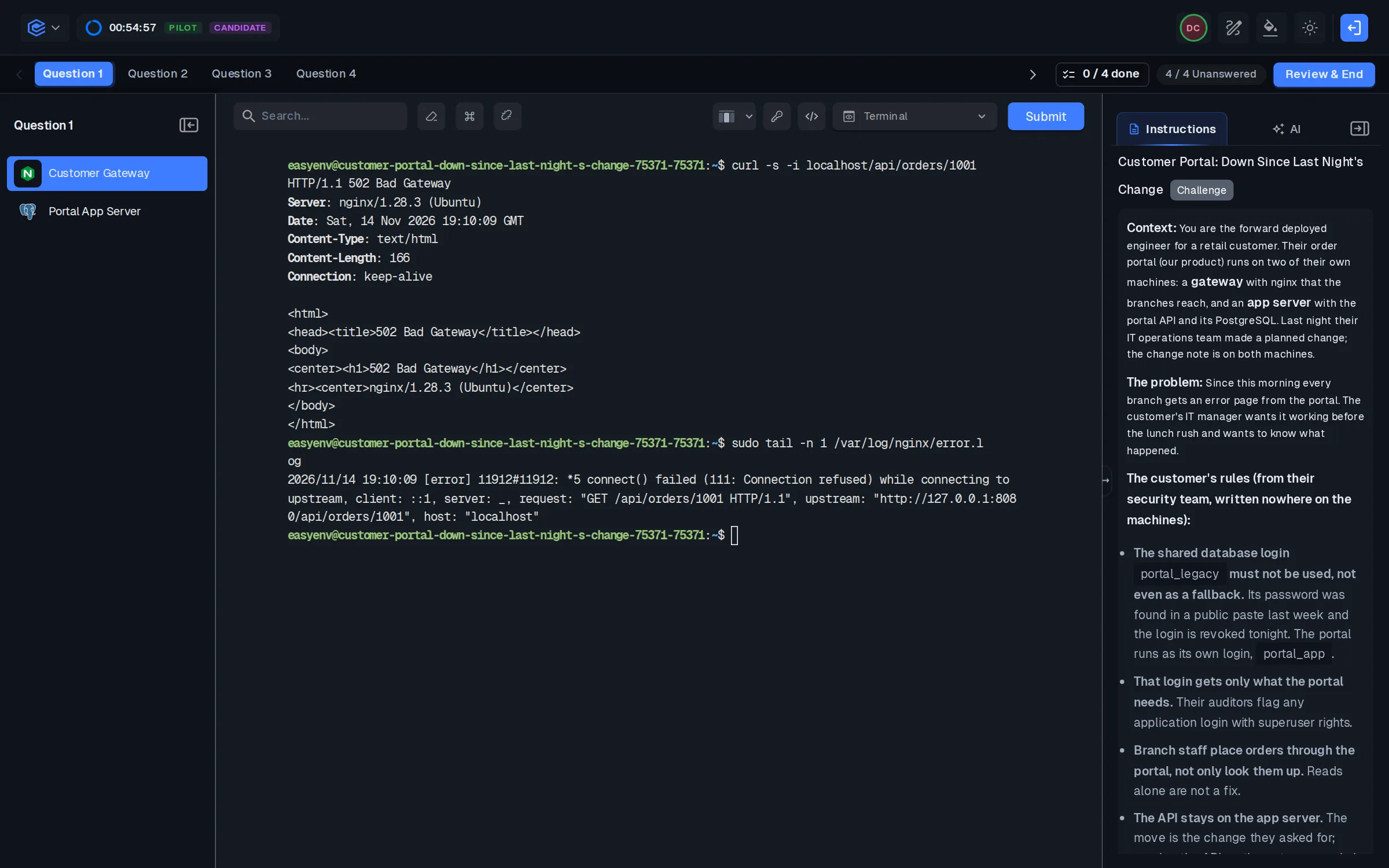
There are three faults, stacked so each one hides the next:
- The gateway's nginx still proxies to
127.0.0.1:8080, where the API used to run. The change note says the gateway needed no change.
- The hardening baseline binds the API on the app server to 127.0.0.1, so nothing outside that box can reach it.
- The new database login the customer's DBA created,
portal_app, has no grants on the orders table, so the API answers 500 with permission denied for table orders.
And rules that appear only in the brief, from the customer's security team: the shared legacy login portal_legacy leaked and is revoked tonight, so the portal must not use it, not even as a fallback. The new login gets only what the portal needs, never superuser. Branches place orders, not only read them. Meanwhile the change note's rollback step copies back an old env file that switches the API to portal_legacy, and it works.
Strong signals. They read /var/log/nginx/error.log before editing anything and see connect() failed (111: Connection refused) against the old address. After the first fix, they read the log again instead of assuming. On the app server they run ss -lntp, find the loopback bind, and open the service to the network the gateway uses rather than reverting the baseline wholesale, because the hardening was the customer's decision. For the database they grant portal_app exactly what the portal does (read and insert on orders, and the sequence that inserts need), as the customer's DBA would, and they note that the grant belongs in the DBA's runbook.
Weak signals. They restart services until something changes. They move the API back onto the gateway. They make portal_app a superuser, or grant only SELECT and never try placing an order. They follow the change note's rollback and swap the legacy login in. That last one is the most important thing this stage can show you: it fixes the portal, passes a naive check, and would be a security incident at a real customer.
Stage 2: the note to the customer's IT manager
The prompt. Write the note to the customer's IT manager about stage 1: what broke, what you changed, what their team must do, and how to avoid it next time.
Strong signals. Five minutes is enough for five or six sentences a non-specialist can act on. The root cause is named as the migration and the hardening change landing together, without blame. What they changed is listed. What the customer must do is explicit: the grant goes into the DBA's runbook for the next server, and the legacy login stays revoked. One concrete prevention step, such as a smoke test after each migration.
Weak signals. A wall of shell output. "Fixed, should be fine now." Blame on the customer's ops team. Nothing the customer has to do.
Stage 3: the CRM contact sync
The scenario. Every night the portal imports the customer's CRM contacts. The sales manager says the portal shows only a fraction of them, and since the last run some people appear twice. The nightly job, sync_contacts.py, and a sandbox copy of the CRM are on the box. The CRM's API notes say: bearer token, cursor pagination at 25 contacts a page, 5 requests a second per token, and 429 with a Retry-After header when you go over. Each contact has a stable id, a status (active or archived) and a consent field.
The brief adds two rules from the customer's data protection officer that are written nowhere on the box, so an AI reading the box will not know them:
- Someone whose email consent is
withdrawn is never stored in the portal. Not flagged, not hidden: not stored. If someone the portal already holds withdraws later, the next run removes them.
- After a
429, nothing may call the CRM until the Retry-After time is up, or their CRM admin revokes the token.
The grading runs the sync twice against a fresh copy of the CRM whose data changes between the runs, so a sync tuned to the sandbox's data passes nothing.
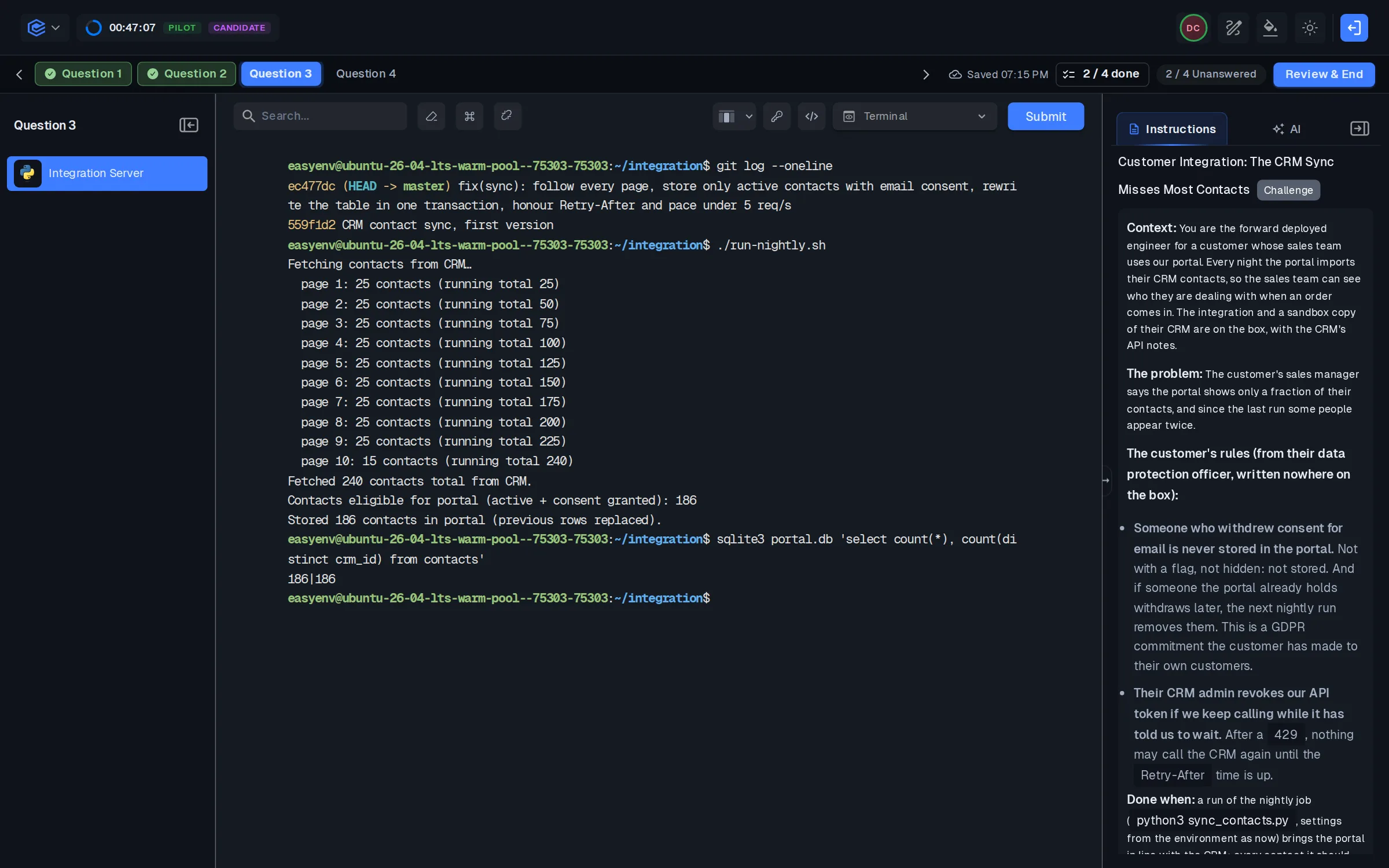
Strong signals. They fetch one page by hand with curl before writing any code, so they see the real shape of a contact. The sync follows next_cursor to the last page. After a 429 it waits the full Retry-After and makes no other call in the meantime. Writes are keyed on the CRM's contact id, so a second run creates no duplicates and picks up changed names and emails. Withdrawn consent is filtered out on import, and anyone the portal holds who has since withdrawn is deleted on the next run. They decide what archived means for the portal and say so.
Weak signals. A sync that reads the first page and stops. A retry loop with a fixed short sleep, or one that keeps calling while it waits. Duplicates on a re-run. A sync that only ever inserts, so people who withdrew stay in the portal. Withdrawn contacts imported, or stored with a flag, because the AI-written code did not know the rule and nobody checked. That last one is a GDPR problem at a real customer.
Stage 4: the tracking pipeline falls behind
The prompt. A parcel carrier runs its tracking platform on one EKS cluster in its own AWS account: a scan intake API, workers that take scan events off an SQS queue, enrich each one through a third-party address service and write it to PostgreSQL on RDS, a tracking website, and a nightly report. An ordinary day peaks at 900 scans a second. Last Monday reached 2,600 and the platform fell behind. Black Friday is in four weeks and the forecast is 7,000. The starting design is drawn, and the write-up holds what the customer's dashboards and on-call log showed. Their platform team is three people who run the cluster with Helm, and nobody there has run Kafka. Find what breaks at 7,000, change the design, and put the changes in the order you would ship them before the code freeze.
Seven faults are hidden in the evidence rather than named: the whole node group in one availability zone and fixed at three nodes, workers fixed at four with no autoscaling, a nightly report with no resource limits that evicts the workers, the address service called on every scan into a 1,000 a second contract, an SQS visibility timeout shorter than the slowest processing (duplicate "delivered" texts) with no dead-letter queue for a poison message, a database near its connection limit, and a dashboard that runs a GROUP BY over a billion rows on the primary every ten seconds.
If you use EasyEnv, this runs on a system design canvas, and the same scenario is a System Design Lab template your team can push traffic through.
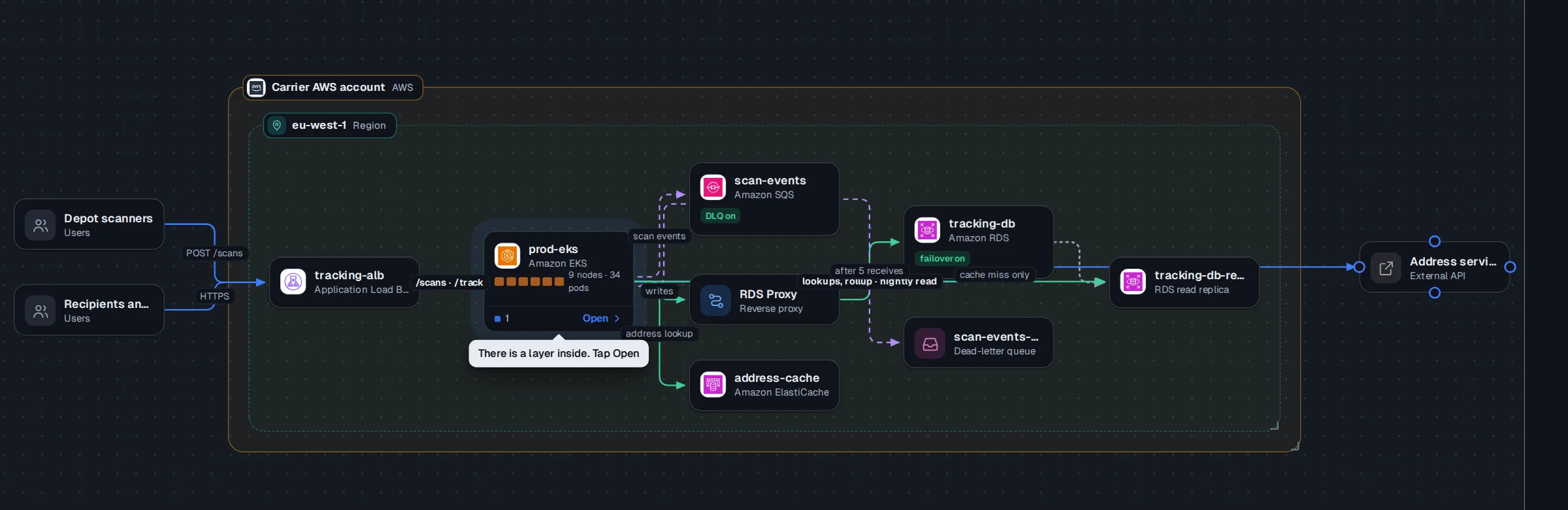
Strong signals. They tie each fault to its evidence: 12 workers with 6 Pending means the nodes cannot grow, CPU under 40% means scaling on CPU is the wrong signal, 93% repeat scans means enrich once per parcel. Week one is the cheap and dangerous: a longer visibility timeout and idempotent writes keyed on the event id, a dead-letter queue, requests and limits with the report moved off the workers' nodes, enrichment per parcel. Then RDS Proxy before any worker scaling, a read replica and a rollup table for the dashboard, Multi-AZ. Then three zones, Karpenter or Cluster Autoscaler, and KEDA on queue age, with a load test at 7,000 and alarms on queue age, DLQ depth, connections and 429s.
Weak signals. Replacing SQS with Kafka, adding Flink, or a rewrite into more services, none of which this load needs and the team cannot run. "Add autoscaling" with no metric. Scaling the workers straight into the address service's limit and the database's connection cap. Everything shipped in the freeze week.
Optional stage 5, for a longer loop: the custom build
This stage is not in the 60-minute template. Add it as a written question, about 10 minutes, if you have the time.
The prompt. The customer asks for a custom feature that only they would use. Scope it: what you would build, what you would not, and how you would say no to the rest.
Strong signals. They find the problem under the request, propose the smallest thing that solves it (often configuration or an export, not a new feature), and say no to the rest with a reason the customer can accept. They mention who else needs to agree, such as the product team.
Weak signals. Yes to everything, with an estimate. Or a flat no with no alternative.
AI: allow it, then judge how it is used
An FDE will use AI at the customer, so blocking it in the interview tests a job that does not exist. The useful question is how they use it.
In stages 1 and 3, the brief holds a rule the AI cannot see: the revoked login, the withdrawn consent, the wait after a 429. A candidate who pastes the brief into a model and runs what comes back will often get a working answer that breaks exactly that rule. A strong candidate puts the constraint in the prompt, reads the code before running it, and tests the result against the real box.
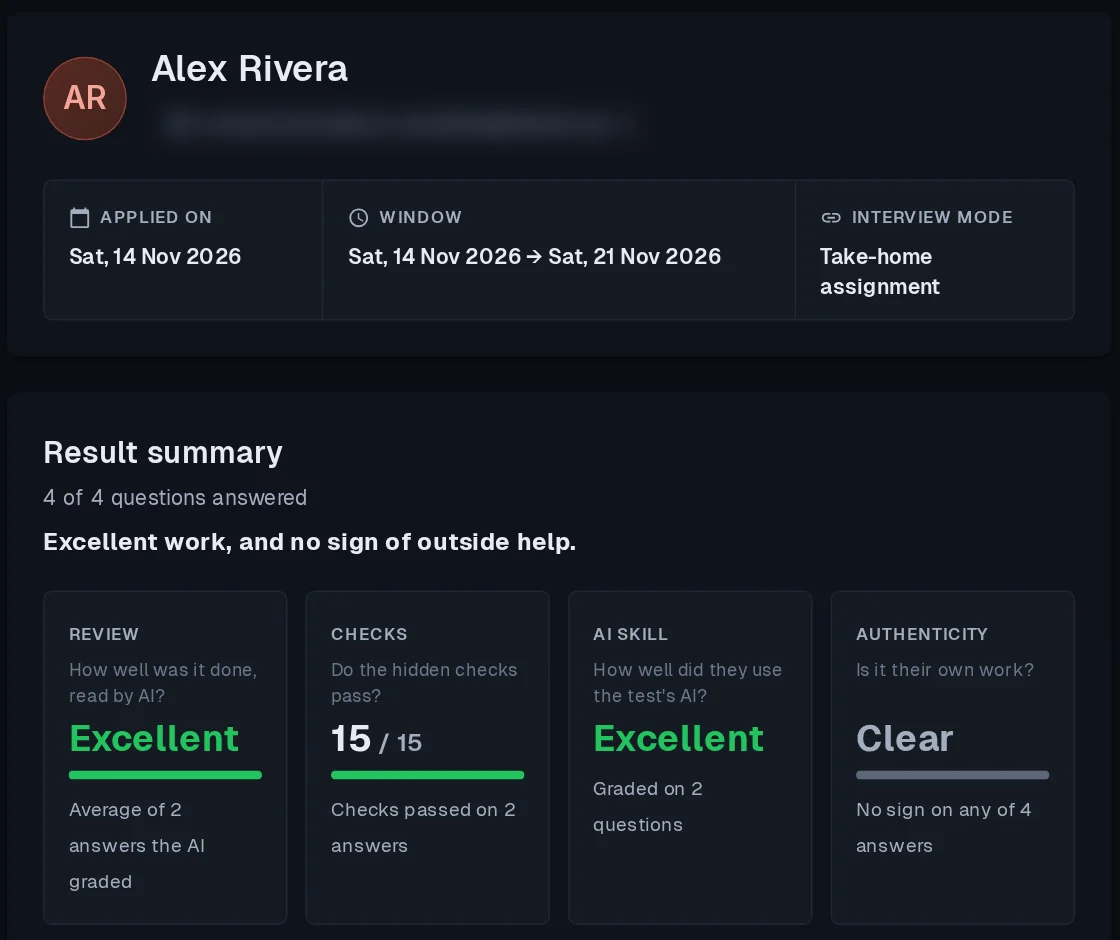
To judge that, you need to see the process, not just the final file. EasyEnv records:
- Every prompt and reply in the built-in AI assistant, replayed in the review next to the terminal.
- Copies, pastes and tab switches for each question: where a copy came from, how long a paste was and its first few characters, never the whole text.
There is also a paste rule. When the brief is copied, the candidate leaves the tab, and a large answer is pasted back, the review flags it. On a role where AI is not offered, that answer is scored Poor, and candidates are told so before they start. On this role AI is allowed, so the flag does not lower the score by itself. The reviewer sees it next to the answer and decides. Our post on AI pair programming assessments goes deeper into how to read a session where the model wrote most of the code.
A scoring rubric for the FDE interview
Score each of the six areas 1 to 4. Write one sentence of evidence for each score, pointing at a moment in the session.
| Area |
1 |
2 |
3 |
4 |
| Debugging |
Guessed, restarted |
Fixed one fault |
Fixed all three, some guessing |
Read evidence first at every layer |
| Constraints |
Used the legacy login or rolled back hardening |
Kept them, without noticing |
Kept them on purpose |
Kept them and wrote them down for the customer |
| Integration |
First page only |
All pages, no rate limit |
Rate limit and re-runs safe |
Plus withdrawn consent never stored and removed on the next run |
| Design |
Textbook diagram |
Plausible, no numbers |
Fits the target |
Fits the target and the ops team |
| Writing |
Shell output |
Accurate, hard to act on |
Clear and actionable |
Clear, actionable, and names what the customer must own |
| AI fluency |
Pasted and ran |
Checked some output |
Gave AI the rules |
Gave AI the rules and verified on the box |
A hire usually scores 3 or more in debugging, constraints and writing. A 1 in constraints is a no, however good the rest is: it is the one mistake that costs the customer, not just you. For a general approach to rubrics, see how to write a technical interview rubric.
Where this loop is not enough
An hour will not tell you how someone handles a customer who is angry for a week, or how they work with your own product team. Use a live session with an interviewer playing the customer for that, or a reference call with someone they were deployed alongside. And if your FDEs mostly build demos before a sale, you want a solutions engineer interview instead; the FDE loop assumes the sale already happened.
Run it on your next FDE hire
You can build this yourself: take one incident your FDEs actually handled this year and turn it into stage 1, including the rule that made the easy fix wrong. That single stage will tell you more than the rest of a standard loop, and it is worth the weeks it takes.
Or start from ours. The Forward Deployed Engineer role has the full loop ready, machines, graders and review included. If your FDEs will deploy your own product, we build the scenarios with you: a broken deployment of your product, an integration with a system your customers run, graded on your customers' rules. Book a demo and bring the incident.
What is the one rule your customers have that a new FDE would most likely break in their first month?